Sprout for school · Otis for home

Your family has a lot to remember. SOFE remembers it for you.

SOFE reads your school and household email, keeps track of schedules and family details, and makes sure everyone in the family knows what's next and who's handling it.

$99 once. No subscription. AI is pay as you go.

iPhone, Android & webPrivate to your familyWorks with Gmail & Outlook
SOFE's Household view: a morning brief and today's items, each with an owner
Built for our family first

We were tired of one parent having to remember everything.

Mike and his family sitting together at home

Our family, SOFE's first household.

If you're a parent, you know the list: school emails, permission slips, activity registrations, schedule changes, appointments. The information is everywhere, but remembering it usually falls on one person.

We built SOFE for our own family, so the important stuff gets captured, understood, and shared instead of carried around in one parent's head. Now I'd love for your family to have it too.

— Mike, founder of SOFE

Ask SOFE

Ask it anything about your family.

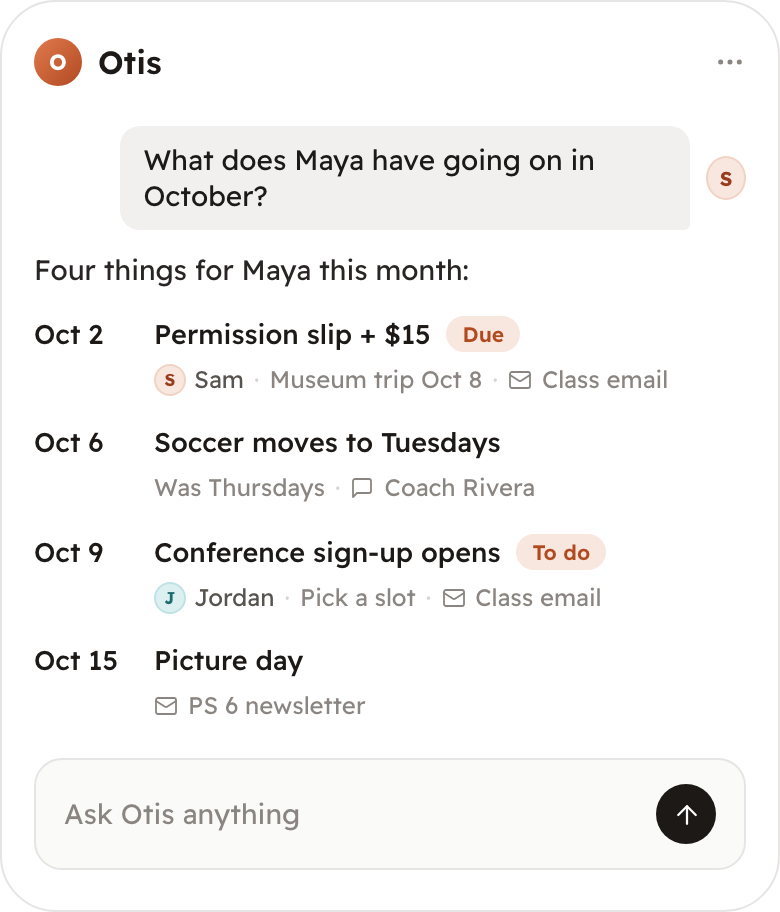
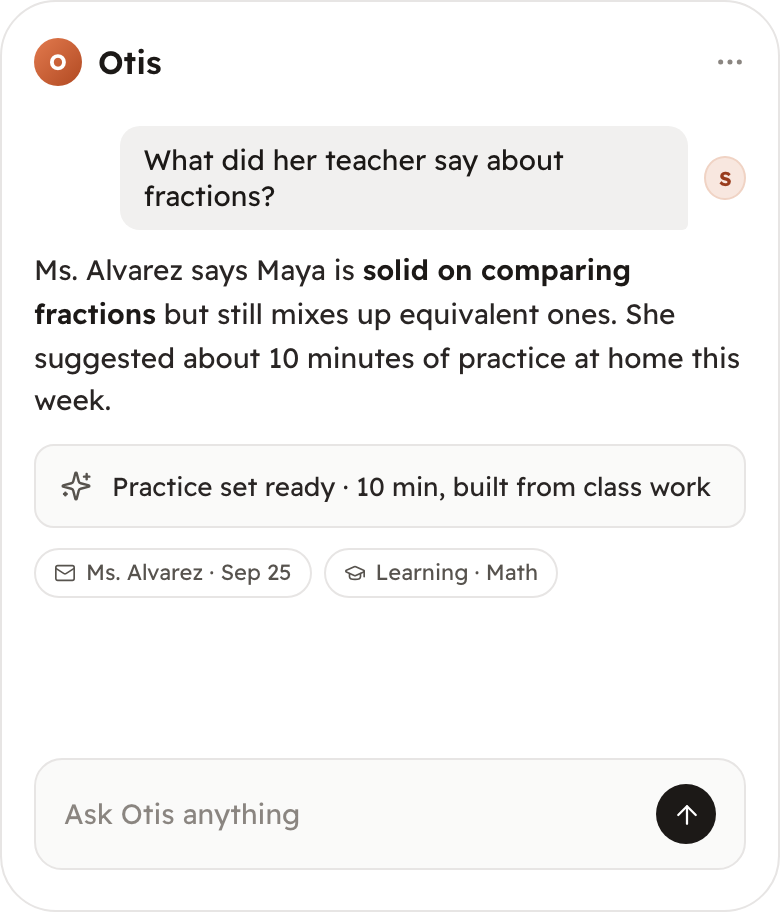
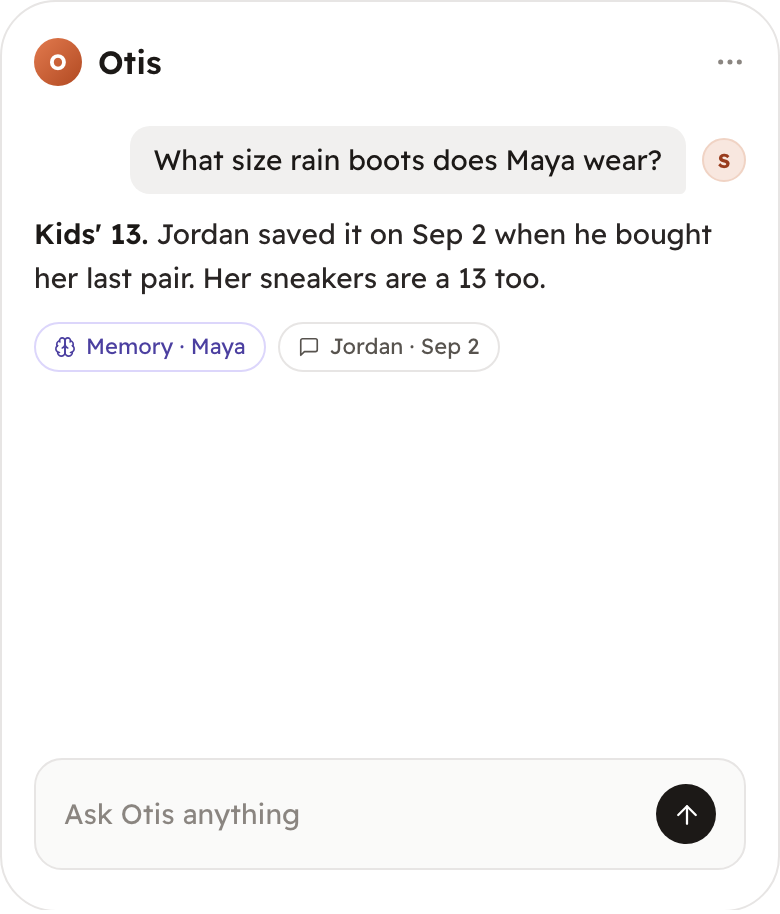
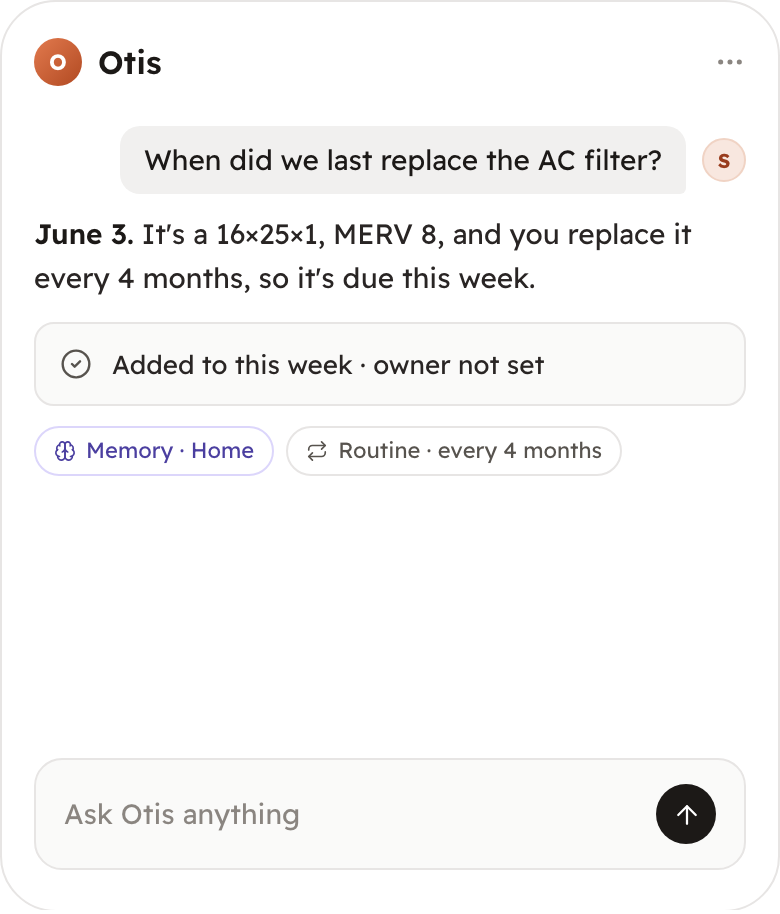
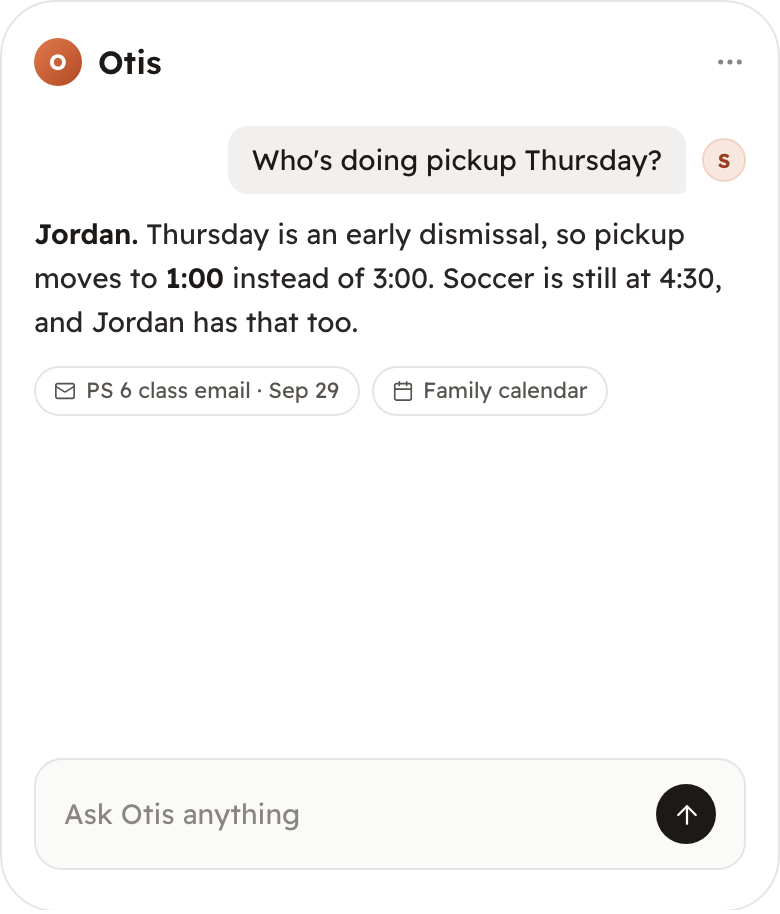
Otis, SOFE's household assistant, answers from what your family has already shared, and shows you where each answer came from.

Every answer links back to the email, note, or saved detail it came from.

Otis listing Maya's four October dates, with the school emails and coach message it used as sources
How it works

From a buried email to a clear next step.

You approve the sources. SOFE does the reading, sorting, and reminding, and makes sure someone owns each thing.

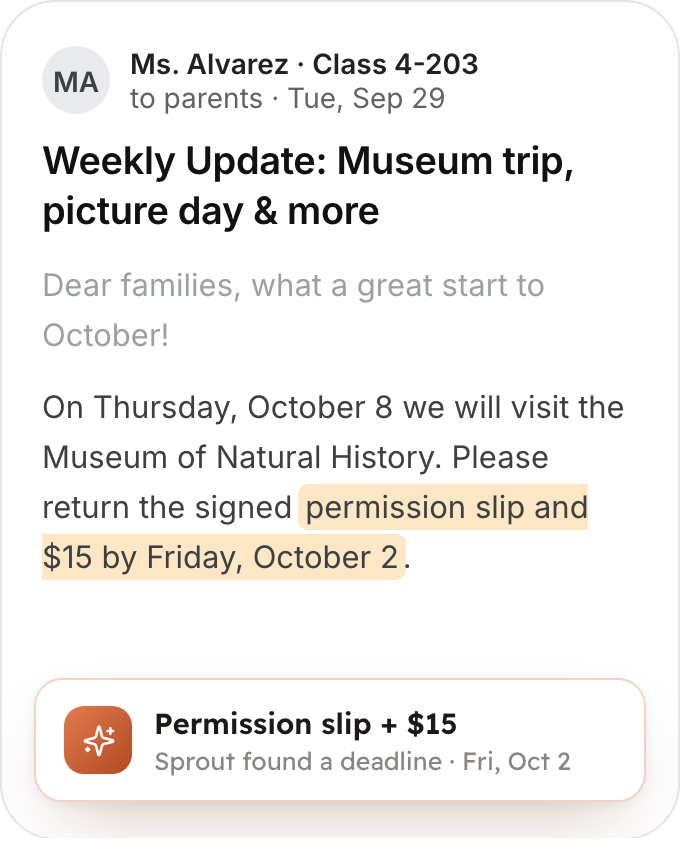
  1. A class newsletter with the permission slip deadline highlighted and Sprout noting the deadline it found
    Step 1

    A school email arrives

    Connect Gmail or Outlook and approve the school and household senders SOFE can read. Sprout spots what needs doing. You can also forward anything yourself.
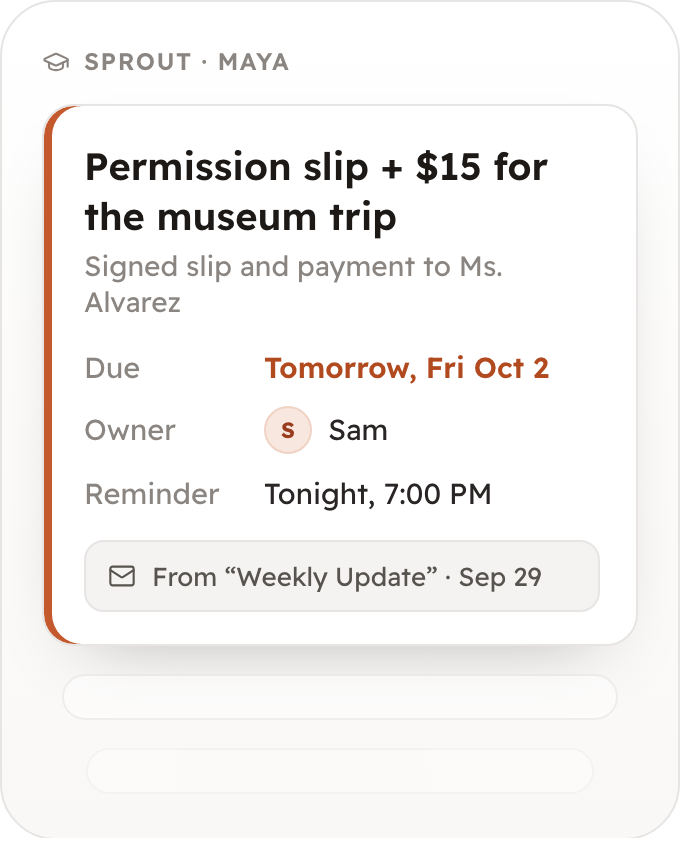
  2. The permission slip as a SOFE item: due tomorrow, owned by Sam, reminder tonight at 7, linked to the email
    Step 2

    It gets a date and an owner

    Deadlines, payments, and events become items with a due date, an owner, and a link back to the original email.

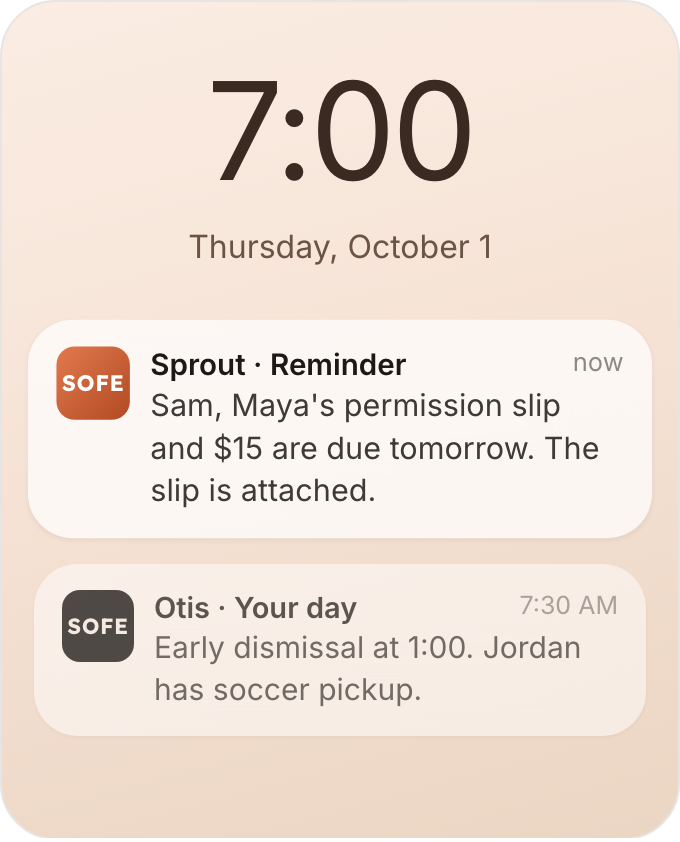
  3. A lock screen reminder telling Sam the permission slip and $15 are due tomorrow
    Step 3

    The right person hears about it

    Reminders and a morning brief arrive by push, text, or email, whichever your family prefers.

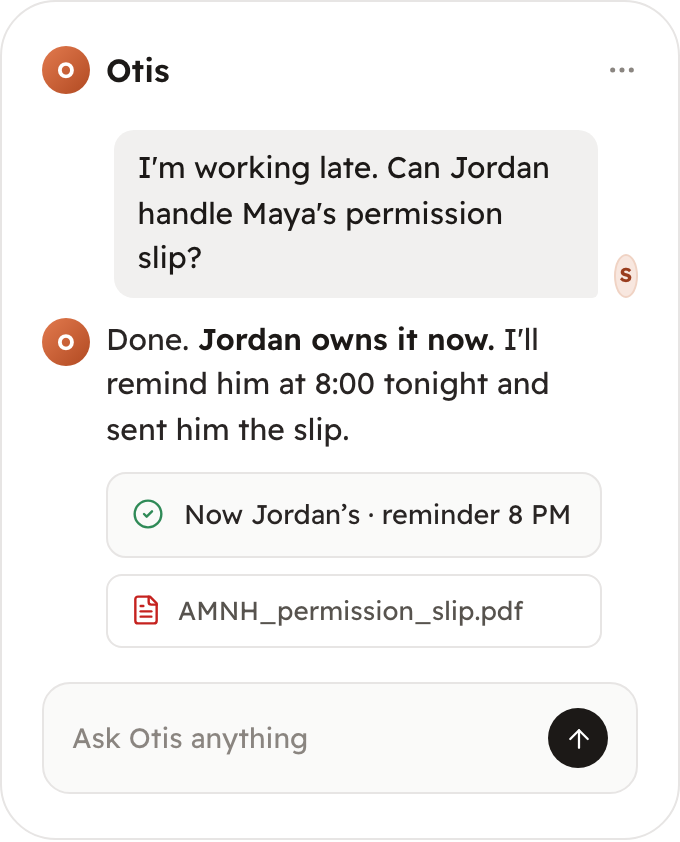
  4. Sam asks Otis to give the permission slip to Jordan, and Otis reassigns it with a reminder at 8 PM
    Step 4

    Hand it off in plain words

    Plans change. Ask Otis to reassign it, and the reminder and the slip go with it.

One family context

Everything connects, so nothing gets explained twice.

School, family details, the house, and your plans all feed one private picture of your family that Sprout, Otis, and anyone you invite can work from.

School

  • Class emails
  • Assignments
  • Teacher notes
  • Test results

Family

  • Sizes & preferences
  • Allergies
  • Doctors & providers
  • Important dates

Home

  • Documents
  • Maintenance
  • Lists
  • Routines

Plans

  • Birthdays
  • Trips
  • Activities
  • Appointments
Your family's context

Private to your household. Yours for life.

YouYour partnerThe kidsThe home
Sprout & Otis

Two assistants working from the same family context.

Sprout handles school and learning. Otis handles everything else your household needs to remember and do.

Forms, payments, and schedule changes, each with an owner and a link to the email it came from.

Sprout showing Maya's next few days: the permission slip due tomorrow for Sam, early dismissal and conference sign-up for Jordan, each linked to its email
Meals & lists

Dinner, planned around your week.

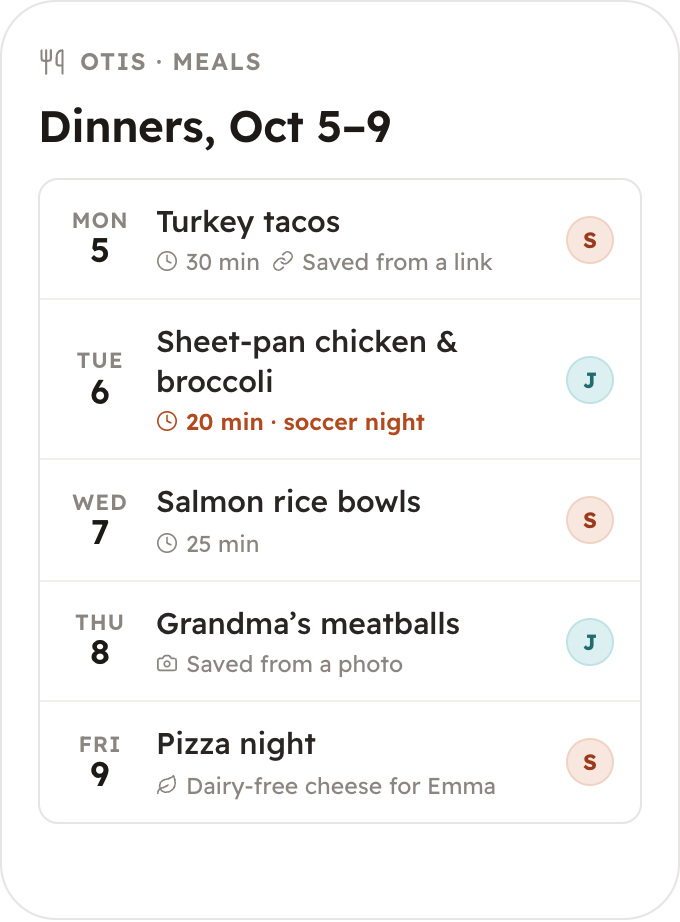
Otis already knows who's dairy-free and which night is soccer. Ask for the week's dinners, and the ingredients land on the shared grocery list.

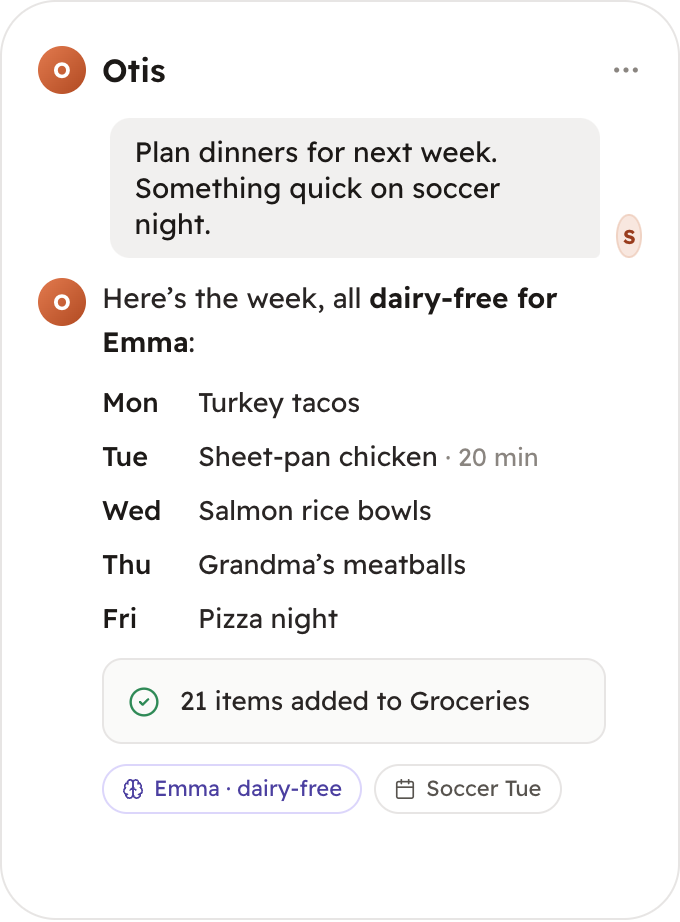
  1. Sam asks Otis to plan next week's dinners; Otis replies with five dairy-free dinners for Emma, a 20-minute meal on soccer night, and 21 items added to groceries

    Ask for the week

    Otis plans dinners around allergies, preferences, and the family calendar, so soccer night gets something quick.

  2. This week's dinners from Monday to Friday, each with a cook, including a recipe saved from a link and one saved from a photo

    Save recipes from anywhere

    Keep a recipe from a link, a photo of Grandma's card, or a text, then plan it into any night. Everyone can see who's cooking.

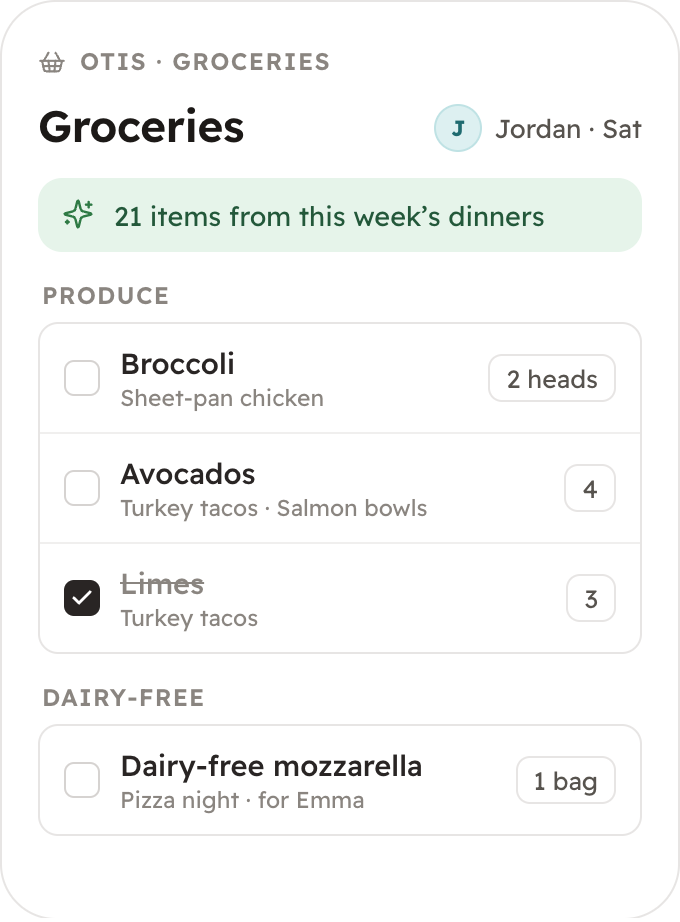
  3. The shared grocery list, owned by Jordan for Saturday, with 21 items from this week's dinners and which meal each is for

    The grocery list fills itself

    Ingredients from the plan land on one shared list, so whoever's shopping has everything.

And every other list your family keeps, shared with whoever needs it:

  • Groceries
  • Recipes
  • Meal plans
  • Workouts
  • Books to read
  • Packing lists
  • Gift ideas
  • Chores
Experts

When you need it handled, not just remembered.

Bring in vetted people for the bigger jobs. They start from what your family has already shared, and only what you allow.

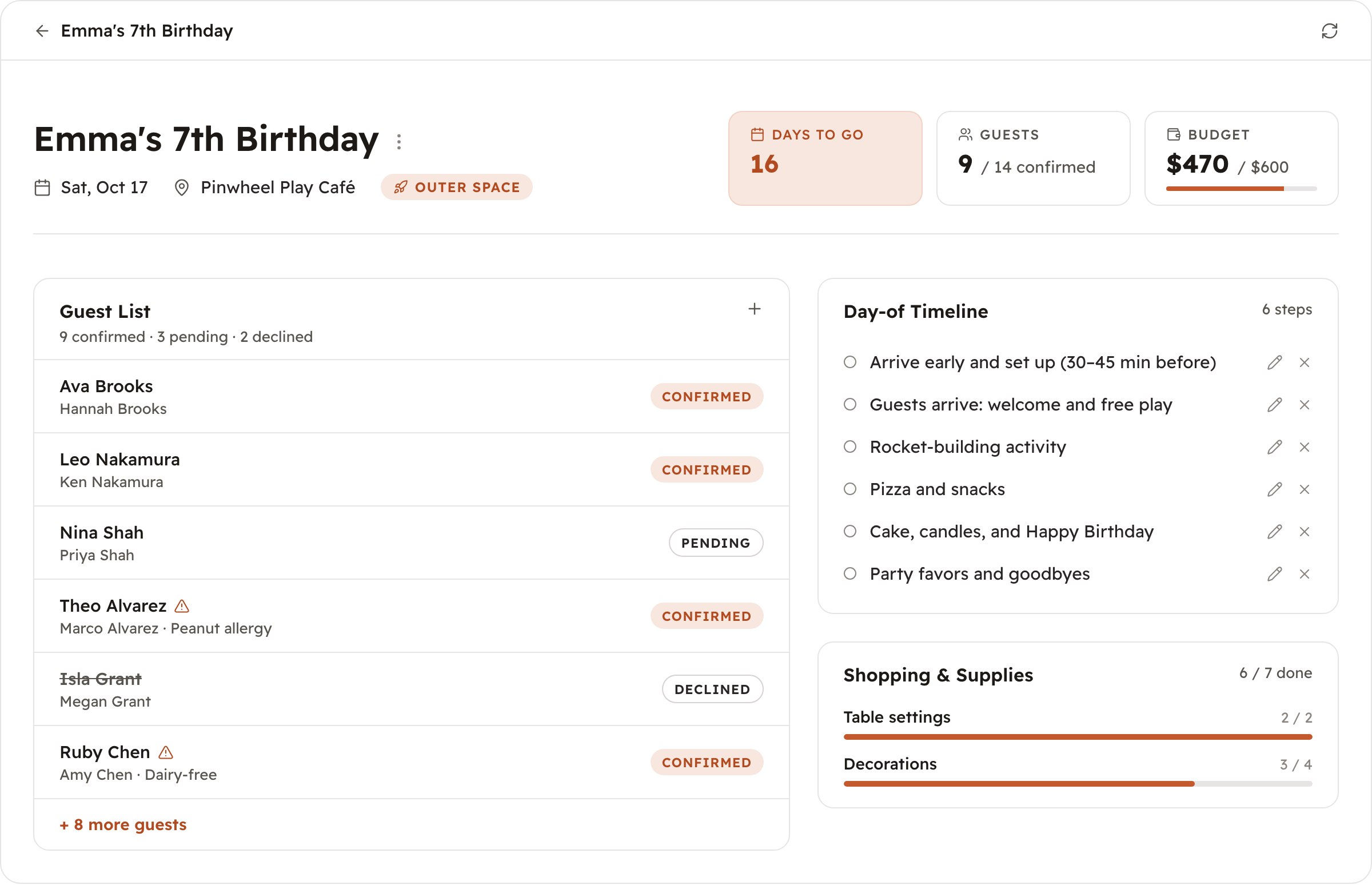
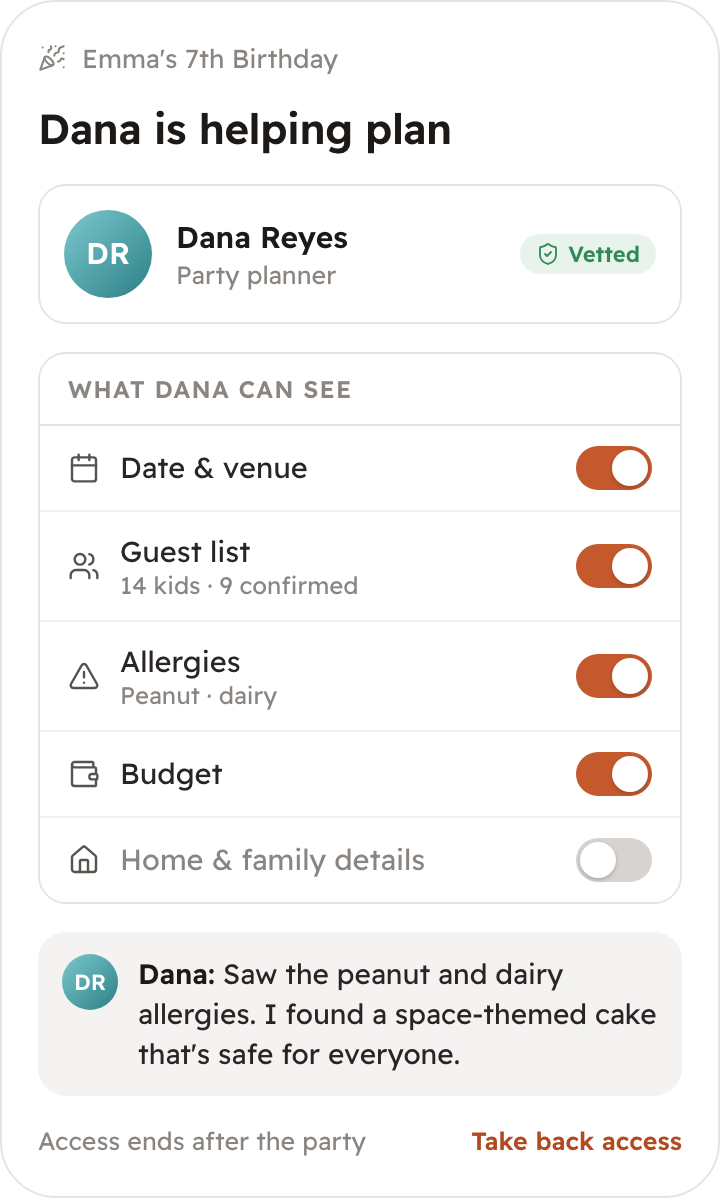
A birthday party plan in SOFE with guest list and allergies, day-of timeline, supplies, and budgetDana, a vetted party planner, can see the date, guest list, allergies, and budget but not home and family details, and has already found an allergy-safe cake

Starts from what SOFE knows

A party planner sees the date, guest list, allergies, and budget. A tutor sees what your child is working on in class.

Shared only with your permission

You approve exactly which details an expert can see, and you can take access back anytime.

Priced per job, before you book

Party planning and tutoring today, with more household help to come. Each expert quotes the job up front, and it's separate from your $99.

Yours for life

Your family's information belongs to your family.

  • A lifetime license. SOFE stays yours, with no subscription required to keep it.
  • Export or delete anything, anytime.
  • Never sold, never used for ads, and never used to train AI models.
  • You choose which sources and people can contribute.
  • An independent Trust & Security Council, so SOFE outlasts any change in who runs the company.
Pricing

Own SOFE once. Pay for AI only when you use it.

No subscription and no monthly bill. You buy SOFE once, and AI costs what your family actually uses.

One-time purchase

Your family's SOFE

$99one time
  • SOFE, Sprout, and Otis, yours for life
  • Hosting included, up to 100 GB
  • $10 in AI credits to start
  • Everyone in your household, every child
  • iPhone, Android, and web apps
  • 30-day money-back guarantee on the $99
Start for $99

After checkout, we email you a sign-in link to start setup.

Pay as you go

AI, as you use it

$2–4a month for most families
  • Top up $10, $20, or $50 whenever you want
  • Credits you buy never expire
  • Nothing is ever charged automatically
  • We let you know well before you run low

If you run out, nothing is missed. SOFE keeps reading your email for 14 more days. After that, new emails wait, and SOFE catches up when you top up.

What happens after checkout

  1. 1
    Check your email

    We send a sign-in link. Open it on your phone or computer.

  2. 2
    Get the app

    Download SOFE for iPhone or Android, or keep going in your browser.

  3. 3
    Connect your email

    Link Gmail or Outlook (and your calendar if you like), then approve the school and household senders SOFE can read.

  4. 4
    Add your family

    Add the kids and invite your partner, so reminders reach whoever owns each thing.

Rather do it with a person? Book a free 20-minute setup call and we'll connect everything with you.

Questions we hear from families

Getting started

What do I need to use SOFE?

SOFE works on iPhone, Android, and in any web browser. Everyone in your household can use whichever they prefer, and everything stays in sync.

How does setup work?

After checkout, we email you a sign-in link. Setup walks you through adding your household, connecting Gmail or Outlook, approving the school and household senders SOFE can read, and choosing how you get reminders. It takes a few minutes. If you'd rather do it with a person, you can book a free 20-minute setup call.

Which email accounts and schools does SOFE work with?

SOFE connects to Google (Gmail) and Microsoft (Outlook) email. You can connect your calendar too, at the same time or separately. It works with however your school emails you: directly, through ParentSquare, Seesaw, ClassDojo, or a class newsletter. If a portal or app doesn't send email, forward a message or screenshot to SOFE instead.

Does SOFE read my entire inbox?

No. SOFE uses read-only access and only processes email from the school and household addresses and domains you approve, plus anything you forward. It never sends, deletes, or changes your email, and you can change the list or disconnect anytime.

Can my partner use SOFE too?

Yes. Everyone in your household is included at no extra cost. Invite your partner, and each of you gets reminders for the things you own, based on the permissions you set.

Using SOFE

What is the difference between SOFE, Sprout, and Otis?

SOFE is the family system you own: one private place for your family's information, schedules, and plans. Sprout specializes in children, school, learning, and activities. Otis handles the rest of family life: memory, reminders, lists, routines, and questions across your household. Both work from the same family context.

What exactly does Sprout track?

Sprout organizes approved school communications into forms, deadlines, events, schedule changes, tasks, assignments, learning topics, projects, and activities. It also sends proactive reminders and school-and-learning summaries.

What if Sprout misses something?

Sprout is built to catch what matters, but in the first few weeks, while it learns your family's sources, it's smart to keep an eye on anything urgent yourself. If something looks off or gets missed, forward it directly and let us know. We use real family feedback to keep improving accuracy.

How will I actually get reminders?

Wherever you already check: push notifications from the SOFE app, text message, or email, based on how your household prefers to be notified. You choose during setup and can change it anytime.

How do experts work?

For bigger jobs like planning a birthday party or tutoring, you can bring in a vetted expert. Each expert quotes the job before you book, and it's paid separately from your $99. You choose exactly which details they can see, so they start from what your family already knows, and you can take access back anytime.

Is it safe to share test results or other learning details?

Yes. Anything you share, like a quiz result or teacher note, stays inside your private SOFE household workspace, is never used to train AI models, and can be deleted at any time. Sharing it is optional, and it's only used for Sprout's learning suggestions.

Pricing

Is SOFE really ours for life?

Yes. Your one-time $99 license includes SOFE, Sprout, and Otis for life, with no subscription. An independent Trust & Security Council exists so SOFE outlasts any change in who runs the company, and you can export your family's information anytime. The only ongoing cost is AI usage, which you pay for as you go.

How much does the AI cost?

Most families spend $2–4 a month. You start with $10 in AI credits, then top up $10, $20, or $50 whenever you want. Credits you buy never expire, and nothing is ever charged automatically. The app shows your balance and about how long it will last at your family's pace.

Why isn't AI included in the $99?

Software is a one-time cost, so you pay for it once. AI costs money every time it reads an email or answers a question, so you pay for what your family actually uses instead of a subscription sized for someone else. When AI gets cheaper, your costs go down too.

What happens if we run out of credits?

Nothing is missed. We let you know well before you run low, and if you do run out, SOFE keeps reading your email for 14 more days. After that, new emails wait in SOFE, still visible to you, and SOFE catches up as soon as you top up. Your family's information and history are always available.

Does it cost more if I have more than one child?

No. Your license covers your whole household: every child, school, and activity you set up. There's no per-child fee.

What if SOFE is not right for our family?

You have 30 days to ask for a full refund of your $99. You can export or delete your family's information at any time.

Get started

Stop being the only one who remembers everything.

$99 once. SOFE, Sprout, and Otis are yours for life, with $10 in AI credits to start.

30-day money-back guarantee. By purchasing, you agree to the SOFE License and Terms of Service.